Showing posts with label Tamil Computer. Show all posts

Twitter now lets you retweet yourself


Twitter has often been criticised as a haven for oversharing narcissists: now its vainest users have one

more way to love themselves.

The social network switched on the ability for users to retweet their own posts, allowing them to re-share tweets that have already appeared in followers’ timelines.

Thankfully, a user can only retweet themselves once, preventing them from clogging up timelines by repeatedly retweeting the same message.


The update also makes it easier for users to quote-tweet themselves, which allows them to write a tweet with another tweet embedded in it.

Whereas before users would have to painstakingly copy and paste their old tweet’s URL into a new tweet, they can now do so by effortlessly pressing the retweet button and selecting “quote tweet”. What a world we live in.

Twitter announced the update last month, alongside a number of other changes such as removing photos and usernames from the character count, and changing who sees tweets beginning with a username.

The self-retweet function is the first of these changes to be activated.

Twitter has also updated its block feature, which stops blocked users from seeing a person’s tweets and prevents tweets from the blocked user showing up in the blocker’s timeline.

Previously, if a third person would retweet either user, the other person would be able to see it, but the updated block feature closes that loophole.


How to Convert WhatsApp Conversation into TXT Format


Convert your WhatsApp Conversation Chat into txt readable format in android mobile without using any third party app.
1. Open WhatsApp App
Open Whatsapp Settings
2. Select Chats and Calls option in settings.
Chats and Calls Settings in Android Mobile
3. Tap on Chat history.
Chat History Settings in Whatsapp
4. Now select Email Chat.
Email Chat in Whatsapp
5. Select any conversation.
Whatsapp Conversation
6.Tap on without media or attach media it’s your choice.
Email Backup in Whatsapp
7. Select Gmail app.
Select Gmail in Whatsapp
8. Tap on three dots and select Save Draft or you can send this mail to any email from send button.
Save Draft in Gmail
Save Draft in Gmail
9. Open your Gmail app and select Draft section.
Draft in Gmail App
Draft in Gmail App
10. Open recent draft email.
Draft Email in Gmail App
11. Download Txt format file in your mobile from a tap on download icon.
Download Txt File
Download Txt File
12. Open this file in your mobile from any txt editor. Here I use ES File TXT editor for open this file in android mobile.
Open Txt File in Android from ES File TXT Editor
View TXT file in Android Mobile

Now you read your Whatsapp Chat into mobile in txt format. You can export this file to your computer and read this file from notepad program.

Best Method to Save Network Data Usage on Android Phone

The rate at which Android devices consumes network data is very alarming, and if you’re a regular internet user via Android devices, you’ll definitely understand what I mean. Most android apps, especially the background apps do consume 30% of our network data without our notice. Even your Android operating system do consume massive portion of data on a daily basis, you should get to notice that if you do monitor the real-time data usage on your android device.


For streaming addicts, you’ve to wave your Android network data a goodbye wave if you don’t take caution on the way you stream videos online, same goes to social networking freaks. Always online 24hours, and you expect a 1GB plan to satisfy you a whole month, *you must be a dreamer* LOL.

You can say NO to all these high data consumption rate only if you get to apply the method I’ll be revealing to you. But before you proceed, first check out these traditional methods to save your network data usage on android.

Read here: 5 Ways to Reduce High Data Consumption on Android Phones

Assuming you’ve applied these traditional methods to avoid high data consumption on your android phone, then you can proceed to this one-way method am about revealing to you.


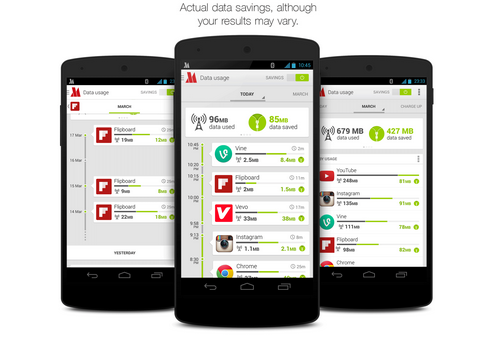
Let me use this medium to introduce you the “Opera Max” android application. It’s a data saving app recommended for all android devices.


To start with, Opera Max app is the best android app for saving mobile network data by extending your data plan and gives user the best control over their data consumption, at the end of the day, you get to save up to 50% of your data plan.

For the records, I hardly subscribe for mobile data (I normally make use of internet tricks), but I do recall the period I subscribed for the Etisalat 2GB internet plan, and within a short period (2 weeks precisely), my Etisalat 2GB monthly plan got exhausted, not that I downloaded much stuffs, but just my moment on social networks and few Live TV streaming with some Apps I run on my android device. The very first time I got to know and implement Opera Max, my story did changed. I managed to save even far above 50% of my normal data usage and the 2GB monthly plan lasted for the whole month with some extra data being rolled over for the next month.

Key Features of Opera Max
  • You get to use less data while streaming music on popular music-streaming apps like Gaana, Youtube music, Pandora etc.
  • Let’s users stream videos online with almost no-data usage. I really enjoy this part because am an addict when it comes to streaming videos. Opera Max uses their advanced technology to control or save our mobile network data while streaming videos.
  • Opera max app helps in blocking crappy background apps that requires data. With this control level, you get to stop unnecessary background apps from consuming our internet data.
  • This app also lets us monitor, track and save both mobile and WIFI data.


Where to download Opera Max?

You can download the opera max from Google play store here. It’s a free app and it works like a charm. If you’ve any question relating to this content, feel free to let me know via comment section and don’t forget to share this tips with your friends on social networks.

Top 2 Best methods to Hack Wi-Fi using Android Phones!


The use of WiFi Network is common to all android users, and it's also available on all android phones. WiFi network is actually a helpful tool for wireless connection to the internet with the use of radio-wave of 2.4Ghz and 5GHz SHF. Wi-Fi can also be known as any wireless local area network (WLAN) product which is actually based on the Institute of Electrical and Electronics Engineering (IEEE) that is of 802.11 standard.

Today's stroll, I would brief you guys on the Top 2 Best methods to Hack Wi-Fi using Android Phones!


Weeks back ago, I got lots of mails from most of my blog readers requesting for apps that could make them hack into any vulnerable Wi-Fi network among their area through the use of their android phones. With the tips I would be briefing you on, bet me, there is a 99.9% chance for any password protected Wi-Fi network to be hacked.

Top 2 Best methods to Hack Wi-Fi using Android Phones

Method 1: Hacking of WPA2 WPS Routers


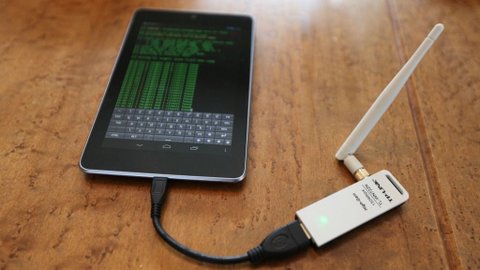
Step 1: Firstly, if your android phone isn't rooted, try to root it, and also make sure that such android phone have a Broadcom bcm4329 or bcm 4330 chipest unlike the Nexus 7, Galaxy S1/S2, Nuxus 1, Htc Desire HD, etc. The presence of Cyanogen ROM on your device can be of use to make the bcmon app work through.


Step 2: Then download and install bcmon, it's essential because it helps monitor mode on your broadcom chipest that helps in the PIN Cracking.

Step 3: After installation, run the app and tap "monitor mode" option.

Step 4: Download and Install Reaver app which helps to crack the WPS Pin to retrieve the WPA2 passphrase.

Step 5: After installation of reaver app, launch it and do an on-screen confirmation, which is, confirming that you're not using it for illegal purpose, then tap the APN or access point you'd wish to crack and continue. Most times, you might need to verify monitor mode to proceed, and this would cause the bcmon to open again. 

Step 6: Verify your settings and also make sure that you've checked the "Automatic Advanced settings" box.


Step 7: Finally, start cracking process by tapping start attack, at this final stage, it can take 2-10hrs for the cracking of WPS to be successful.


Method 2: Hacking of WEP Routers

Step 1: Firstly, if your android phone isn't rooted, try to root it, and also make sure that such android phone have a Broadcom bcm4329 or bcm 4330 chipest unlike the Nexus 7, Galaxy S1/S2, Nuxus 1, Htc Desire HD, etc. The presence of Cyanogen ROM on your device can be of use to make the bcmon app work through.


Step 2: Then download and install bcmon, it's essential because it helps monitor mode on your broadcom chipest that helps in the PIN Cracking.


Step 3: After installation, run the app and tap "monitor mode" option.


Step 4: Then tap the "Run bcmon terminal" option and type "airodump-ng" and Enter. Once the airodump loads finish, you would be directed to the prompt command in which you're to type "airodump-ng wlan0" then tap the Enter button.


Step 5: In this stage, a Mac address would appear, in which you're to jot down.


Step 6: Start scanning the channel by collecting information from the access point before attempting to crack the password, then type, "airodump-ng -cchannel#--bssidMAC address-w output eth0" and tap enter, then it would start scanning, try scanning till it reaches 20,000 - 30,000 packets.


Step 7: To finally crack the password, return to the terminal, but make sure you've reached the suitable number of packets, then type "aircrack-ng output *.cap" and tap enter at the terminal.


Step 8: Once the password is cracked successfully, you would receive a message alerting, 'Key Found' and would display the key in hexidecimal form. So when entering the key, make sure you eliminate the dots '.' or double dots ':', i.e if it displays12:34:56:78:90, then enter 1234567890 as the code.


The use of osmino WiFi app seems to be the best any easiest method when hacking into a WiFi network. Actually, it doesn't do any hacking but it serve as help to retrieve the already hacked password by someone else. It also tracks down the location of such vulnerability and gets connected it's network.
To download osmino WiFi app, click here.


10 Websites that Teach Coding and More!

1. Codeacademy 

     
Codeacademy leads you through the process of learning to program web-oriented languages. Here you can learn Javascript, Python and Ruby, etc. The free environment provides a safe place for experimentation, as you can try things out without needing a web server or any other hardware or software. If you are starting from scratch (or have limited experience) then Codeacademy is a brilliant starting point. Not only are you provided with access to the courseware, but having the ability to test things is incredibly useful for safe try out.
  
2. Lynda.com

The online tutorials offered by Lynda.com are recognized as some of the best e-learning courses out there. You need to pay for a monthly subscription, but this will give you access to over 2,000 courses covering over 140 different skill areas. Lynda.com isn’t just for learning to code: you will also get access to courses covering areas as diverse as 3D animation, business, video editing, and design. 

3. Udacity

 Udacity aims to be the future of online higher education. Courses are pitched at high schoolers who wish to get ahead, college students who want to broaden their understanding, and professionals needing to brush up their skills. There is a lot of excellent courseware that you can access once you’ve signed up, covering business, sciences and computer science.

4. Coursera


Coursera provides you with course materials created by a number of reputable worldwide universities. The courses tend to be introductions to subject areas and lend themselves to those who wish to gain a general understanding before going further. This is great if you wish to study further and start on a new path. Coursera is one of the 10 websites that teach coding and more as it goes beyond learning to code, or, indeed, learning new technologies.

5. W3Schools.com

 If you wish to learn the majority of the web-based languages, then W3Schools is an indispensable reference site. The site shows you how to code with and use HMTL, CSS, HTML5, Javascript, PHP and ASP, amongst others. What is great about the site is that if you search for a particular element of code it returns an example of how to use it practically. As a result you get something that you can adapt and put together to make a cohesive whole.

6. Apple Developer Program

 This is the place you start if you plan to develop apps for iOS and OSX. Whether you wish to develop apps for iPhone, iPad or Mac you should sign up for the Apple Developer Program. This allows you to get access to the latest documentation and code examples. Not only that, but it is the recommended way to get your apps and applications into app stores. There are many well-documented examples with code that you can run to get you started. You get shown how to use the XCode environment and start creating your first app. One prerequisite of developing for iOS is that XCode only runs within OSX, so you will need a Mac of some description.

7. Developer.Android.com

 For app developers wishing to learn how to code Android Java apps ready for the mobile platform, this is the place to start. Here you will be able to download an Android-infused version of Eclipse IDE. There are buckets of code examples, which will get you running apps in a virtual environment or on your device.

8. Developers.Google.com

 Learn how to expand some of the coding skills you’ve picked up along the way into extending Google products at developers.google.com. Whether it be Chrome extensions, interacting with Google Drive, or creating applications that utilize Google Maps, there are well documented APIs and lots of example material to get you going.

9. MSDN.Microsoft.com

 Microsoft provide lots of material on their developer network for the free and paid editions of their Visual Studio products. Learn how to master Visual Basic, C++ or C# for Windows environments using the .Net Framework. As with many of the others there are lots of tutorials and example code for you to build, run and play with. If you are wanting to develop apps for Windows, then this is a really great starting place and may well be the only stuff you ever need.

10. Instructables

Instructables shows you how to get things done. This might involve getting an Arduino to communicate with the world, starting making use of a Raspberry Pi, or just generally hacking things together. There are many inspirational instructables, all created by the community. If you have a good set of instructions yourself, this is also something that you could contribute to. This finds its way into the 10 websites that teach coding and more as it does a lot more than just show you how to code.

If hope you guys like this Article . if yes then share it with your friends  -