Showing posts with label Technology. Show all posts

Floating Underwater Tunnels Planned for Norway


Geographically speaking, Norway is an especially tricky place for motorists. With more than 1,100 fjords — the deep glacial water inlets that divide land masses — driving from point A to point B typically requires points C through Z, several bridges, and a couple of ferry rides.

To remedy the problem, Norway is undertaking an ambitious project to build a fully submerged floating traffic tunnel beneath the waves of the Sognefjord, a troublesome body of water that runs 3,000 feet wide and 4,000 feet deep.

According to planners, the tunnel would be attached to massive pontoons floating on the surface of the water, and further stabilized by trusses connecting dual tubes. The side-by-side cylinders would enable uninterrupted traffic in both directions, and would hang around 70 to 100 feet under the surface of the water.

The tunnel would be the first of its kind in the world, and it solves a number of problems that have otherwise stymied public planners. For one thing, certain geographical features around the Sognefjord make suspension bridges or even traditional floating bridges impractical. Bridges are also subject to damage from Norway's famously rough weather.

Underwater tunnels also have the distinct advantage of keeping the waterway clear for commercial ships and — particularly important on the Sognefjord — Navy vessels. The depth of the fjord prohibits conventional tunnels, but a suspended underwater passageway would split the difference nicely.

This is no pipe dream, either. (Well, it is.) Norway has already committed $25 billion in funds toward the project. If all goes according to plan, the Sognefjord tunnels will be completed by 2035.

Then, depending on the success of the initial structure, additional floating tunnels will be considered for other problem areas within Norway's unique road grid. Planners say that if the long-term models and computer simulations hold up, underwater floating tunnels could cut north-south cross-country drive time in half, from 22 hours to 11 hours.


Bluetooth 5.0


How to Secure the Internet of Things Inside Your Home


The Bluetooth Special Interest Group (SIG) has announced the new Bluetooth 5 spec, currently slated for delivery in late 2016 or early 2017. While it won’t appear in devices until sometime after that, the BT 5 protocol should be a significant improvement over Bluetooth 4.2, which mostly focused on improving compatibility with the Internet of Things (IoT) and associated devices.

Bluetooth 5 is expected to deliver four times the range of Bluetooth 4.2, twice the speed, and eight times the data broadcasting capability. The IoT capabilities baked into BT 4.2 will be expanded as well; the Bluetooth SIG is claiming that the increased range, performance, and total broadcasting capability will allow IoT devices like smartwatches to move away from a paired app-device model and operate independently in their own right. Whether this is actually true is something of an open question: Wearables like the Apple Watch or Android Wear-compatible products would benefit from increased autonomy, but the battery power and screen size on a watch are both intrinsic limiting factors. Transmitting and receiving data is expensive relative to the total amount of battery power packed into most wearables.

Bluetooth low energy will continue to be an important pillar of the Bluetooth 5 standard


The increased capabilities of Bluetooth 5 should make it easier to have a wireless Bluetooth speaker in one room while you stream data from elsewhere. Current Bluetooth can be a bit hit-or-miss in this regard; some peripherals tolerate blocked lines of sight better than others. I have two pairs of equally priced Bluetooth earbuds — one of them can pick up a signal from anywhere in the apartment, while the other pair starts skipping if I slip my phone into my pocket. Walking out of a room and leaving my phone behind simply doesn’t work.


The Bluetooth SIG believes that BT5 will be much more than just a performance-improving update to existing peripherals. “With eight times the broadcast messaging capacity, Bluetooth 5 will further propel the adoption and deployment of beacons and location-based services in the home automation, enterprise, and industrial markets,” the SIG said in a statement. “In scenarios where contextual awareness like navigation and pin-point location are crucial – such as hassle-free airport navigation experiences, asset tracking of warehouse inventory, emergency response, even smart city infrastructure that helps the visually impaired be more mobile – Bluetooth 5 will send custom information people actually find useful in that moment without connection and application barriers.”

That’s a fairly optimistic assumption for a protocol usually used for pairing wireless earbuds or headsets with other hardware, but everyone’s allowed to be an optimist. Even if Bluetooth 5 doesn’t usher in a brave new world of crappy IoT devices, it’ll be nice to see better battery life and increased range from existing types of hardware.

Twitter now lets you retweet yourself


Twitter has often been criticised as a haven for oversharing narcissists: now its vainest users have one

more way to love themselves.

The social network switched on the ability for users to retweet their own posts, allowing them to re-share tweets that have already appeared in followers’ timelines.

Thankfully, a user can only retweet themselves once, preventing them from clogging up timelines by repeatedly retweeting the same message.


The update also makes it easier for users to quote-tweet themselves, which allows them to write a tweet with another tweet embedded in it.

Whereas before users would have to painstakingly copy and paste their old tweet’s URL into a new tweet, they can now do so by effortlessly pressing the retweet button and selecting “quote tweet”. What a world we live in.

Twitter announced the update last month, alongside a number of other changes such as removing photos and usernames from the character count, and changing who sees tweets beginning with a username.

The self-retweet function is the first of these changes to be activated.

Twitter has also updated its block feature, which stops blocked users from seeing a person’s tweets and prevents tweets from the blocked user showing up in the blocker’s timeline.

Previously, if a third person would retweet either user, the other person would be able to see it, but the updated block feature closes that loophole.


Microsoft to buy LinkedIn for $26bn

LinkedIn and Microsoft logos

Microsoft is buying the professional networking website LinkedIn for just over $26bn (£18bn) in cash.
The software giant will pay $196 a share - a premium of almost 50% to Friday's closing share price.
The deal will help Microsoft boost sales of its business and email software.
Microsoft said that LinkedIn would retain its "distinct brand, culture and independence".
Ben Wood, head of research at CCS Insight, said the deal would give Microsoft access to the world's biggest professional social network with more than 430 million members worldwide.
"That's a valuable asset that can be deeply integrated with a number of Microsoft assets such as Office 365, Exchange and Outlook. That said, Microsoft has stated that the company will continue to operate as an independent business, so we'll have to see how deeply the integration occurs," Mr Wood said.

Analysis: Rory Cellan-Jones, technology correspondent

Ever had one of those annoying LinkedIn emails inviting you to "endorse" a contact for some skill or another? Perhaps LinkedIn chief executive Jeff Weiner and its founder Reid Hoffman deserve to be endorsed for salesmanship after today's deal.
After a tricky period in which the shares have fallen amid widening losses, they have persuaded Microsoft to make its biggest deal. The software giant is paying a 50% premium on Friday's closing share price to buy LinkedIn, a price which amounts to $250 (£170) for every active user. To put that into context, that's about the market value of Sky, or eight times as much as Daily Mail owner DMGT - and they are both profitable.
But this deal is about more than money: it is meant as a powerful signal of where Satya Nadella is now taking Microsoft. He sees its future as a cloud computing business providing all sorts of professional services to clients - including a social network to connect them to each other.
"We are trying to ride the wave of the new technologies," Mr Nadella told me from Seattle. "It's about AI, it's about mobile, it's about cloud and we're trying to bring those things together."
However, the deal to buy Nokia's mobile phones division had a similar logic - and the entire value of that purchase was written off just a year later. So Microsoft's investors may look at that $26bn price tag nervously, while anyone with a few LinkedIn shares may be using the network to send a message of congratulations to their board.

Microsoft chief executive Satya Nadella said he had long admired LinkedIn: "I have been thinking about this for a long time."
The deal was "key to our bold ambition to reinvent productivity and business processes", he added.


a different approach to integrating LinkedIn to preserve its culture and brand, Mr Nadella said: "That's what's going to be very very different about thMicrosoft had a long record of successfully integrating acquisitions, he explained, citing Minecraft - the video game whose maker it bought in 2014 for $2.5bn - as well as its very first purchase: the presentation software PowerPoint for $14m in 1987.


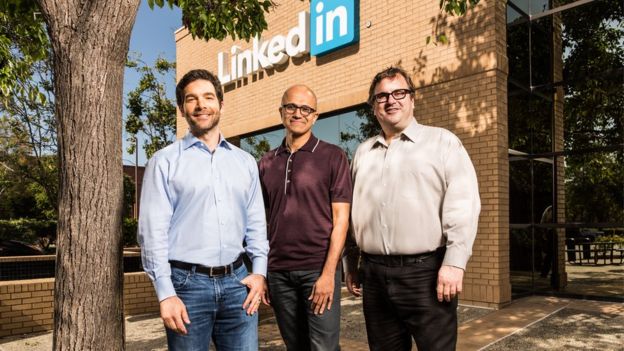
Jeff Weiner, Satya Nadella and Reid HoffmanImage copyrightMICROSOFT
Image captionLinkedIn chief executive Jeff Weiner (left), with Microsoft chief executive Satya Nadella and LinkedIn chairman Reid Hoffman (right).

LinkedIn shares soared 47%, or $61.50, to $192.60 in New York following the announcement of the deal.
Shares in the company, which floated in May 2011, have fallen by more than 40% this year.
The stock plunged by a quarter in February after the company issued a profit warning for the first quarter and reported an annual loss of $166m.
Ivan Feinseth, analyst at Tigress Financial Partners, said that LinkedIn was a great business "even though the company stubbed their toe back in February. It's a premium company and it deserves a premium valuation."
Shares in Microsoft fell 2.6% to $50.16, bringing the decline this year to almost 10%.

'Incredible opportunity'

Jeff Weiner will remain chief executive, reporting to Mr Nadella. He and Reid Hoffman - the chairman, co-founder and controlling shareholder of LinkedIn - both backed the deal.
"Today is a re-founding moment for LinkedIn," said Mr Hoffman. "I see incredible opportunity for our members and customers and look forward to supporting this new and combined business."
LinkedIn has been trying to expand by offering users more messaging options, mobile apps and a revamped "newsfeed" to help boost engagement.
Last year, the site pledged to send less frequent and "more relevant" messages after numerous user complaints.
The takeover is by far the biggest acquisition made by Microsoft, which paid $8.5bn for Skype in 2011 and bought Nokia's mobile phone business for $7.2bn in 2013.
The LinkedIn acquisition also eclipses the $19bn that Facebook paid for WhatsApp in 2014.
Despite having a cash pile of about $92bn, Microsoft said it would pay for LinkedIn mostly by issuing new debt.
It expects the deal, which must be approved by regulators in the US, EU, Canada and Brazil, to generate annual savings of $150m by 2018.

Difference Between File System NTFS, FAT32, and exFAT


Whether you’re formatting an internal drive, external drive, USB flash drive, or SD card Windows will give you three choices of file system NTFS, FAT32 and exFAT. And we always choose one that Windows recommends. But do you ever wonder what is the difference between each file system and what happens to storage medium when we choose a different one. Since Windows doesn’t explain the difference, so we will.

What is Filesystem ? 

A filesystem is the methods and data structures that an operating system uses to keep track of files on a disk or partition; that is, the way the files are organized on the disk. The word is also used to refer to a partition or disk that is used to store the files or the type of the filesystem.

Many operating systems include support for more than one file system. Sometimes the OS and the file system are so tightly interwoven it is difficult to separate out file system functions. Microsoft Windows mainly makes use of the NTFS, FAT32 and exFAT file systems. So we are going to discuss about these three file systems in details.

NTFS Filesystem 


NTFS is the modern file system Windows likes to use and  introduced with the Windows NT operating system in 1993. When you install Windows, it formats your system drive with the NTFS file system. NTFS has file size and partition size limits that are so theoretically huge you won’t run up against them. Your Windows system partition must be NTFS. If you have a secondary drive alongside Windows and you plan on installing programs to it, you should probably go ahead and make it NTFS, too.


Features : 
NTFS is packed with modern features. It supports file permissions for security, a change journal that can help quickly recover errors if your computer crashes, shadow copies for backups, encryption, disk quota limits, hard links, and other various features. Many of these are crucial for an operating system drive — especially file permissions.


Compatibility : 
NTFS will work with all recent versions of Windows but it has limited compatibility with other operating systems. By default, Mac OS X can only read NTFS drives, not write to them. Some Linux distributions may enable NTFS-writing support, but some may be read-only. None of Sony’s PlayStation consoles support NTFS. Even Microsoft’s own Xbox 360 can’t read NTFS drives, although the new Xbox One can. Other devices are even less likely to support NTFS.

FAT32 Filesystem


FAT32 is the oldest file system here. It was introduced all the way back in Windows 95 to replace the older FAT16 file system. This file system’s age has advantages and disadvantages. Because it’s so old, it’s the de-facto standard. Flash drives you purchase will often come formatted with FAT32 for maximum compatibility across not just modern computers, but other devices like game consoles and anything with a USB port.

Features : 
The family of FAT file system is supported by almost all operating systems for personal computers.

Limitations : 
Limitations come with that age, however. Individual files on a FAT32 drive can’t be over 4 GB in size — that’s the maximum. A FAT32 partition must also be less than 8 TB, which is less of a limitations — but still a noticeable one if you have a new, high-capacity mechanical drive. While this file system is okay for USB flash drives and other external media, you won’t want to use this for an internal drive. It lacks the permissions and other security features built into the more modern NTFS file system. Modern versions of Windows can no longer be installed to FAT32, and must be installed onto drives formatted with NTFS.

Compatibility : 
Works with all versions of Windows, Mac, Linux, game consoles, and practically anything with a USB port.

exFAT Filesystem

xFAT is a proprietary and patent-protected file system with certain advantages over NTFS, introduced in 2006 and the file system is supported with newer Windows systems, such as Windows Server 2003, Windows Vista, Windows 2008, Windows 7, Windows 8, and more recently, support has been added for Windows XP.

Features : 
Like NTFS, exFAT has very large file size and partition size limits. This means you can store files that are larger than 4 GB apiece on a flash drive or SD card if it’s formatted with exFAT. exFAT is a strict upgrade over FAT32, and should be the best choice for external drives where you want a lightweight file system without FAT32’s file size limits.

Compatibility : 
exFAT is also more compatible than NTFS. Works with all versions of Windows. While Mac OS X includes only read-only support for NTFS, Macs offer full read-write support for exFAT. exFAT drives can be accessed on Linux by installing the appropriate software.While exFAT is compatible with Macs — and will be compatible with some devices that don’t support NTFS, like digital cameras — it still isn’t quite as compatible. Microsoft’s own Xbox 360 doesn’t support it, although the Xbox One does. The PlayStation 3 doesn’t support exFAT drives, although the PlayStation 4 reportedly does. Various other older devices may only support FAT32 instead of exFAT.

So in short NTFS is ideal for internal drives, while exFAT is generally ideal for flash drives. However, you may sometimes need to format an external drive with FAT32 if exFAT isn’t supported on a device you need to use it with.

The New method to Hide SMS or Private Messages on Android.


Receiving private messages is one thing, keeping it safe and secured is another deal. Most individual are fund of exposing their private messages to public. Do you know that you your account security can be easily compromised if the number used in receiving bank notification aren’t secured? There are also several reasons we should keep our SMS private and secured.


Recently, I came across a new method to keeping private messages locked out from eye prying, and unlike every other method, this method seems to work perfectly and gives your SMS the maximum security. With the help of the application I’ll be revealing, you stand a chance to hide all your private messages from eye prying.

So what’s this application name?

The application name is codenamed “Message Lock aka SMS lock”. However, the app is compatible on all android devices and it comes with a very high rating. Let me quickly make a brief description about the message& SMS lock app.


About Message & SMS Lock

The Message lock aka SMS lock application is a light tool that is developed for special purpose which is protecting your personal messages. Maybe, you’re the kind of person that lends your device to friends to play games, listen to music, watch movies or whatsoever, and you wish to keep them locked out from going through your personal messages, then it’s advised you make use of Message & SMS lock.

With this light tool, you can easily gain full privacy protection on your messages and lock patterns is also made available on Message & SMS lock tool.

One of the most recent features on Message & SMS lock app is the fingerprint enabled features which is made available for fingerprint enabled devices like the Galaxy devices with fingerprint scanner. It also comes with an outstanding locking engine and password retrieval is possible.


Ubuntu’s bash and Linux command line coming to Windows 10


'Microsoft loves Linux' so much that now the company is bringing the popular Bash shell, alongside the entire Linux command environment, to its newest Windows 10 OS in the upcoming 'Anniversary Update,' Redstone.

The rumours before the Microsoft’s Build 2016 developer conference were true. Microsoft has just confirmed that it is going to enable its users to run Bash (Bourne Again Shell) natively on Windows 10.


Microsoft has partnered with Ubuntu's parent company Canonical to ensure the Bash experience for users is just as good in Windows OS as it's in variants of Linux.

Although the Goal of the partnership, in the end, is to bring Ubuntu on Windows 10, don't expect it to run Ubuntu directly on Windows 10.


Users will be able to download Bash from the Windows Store. BASH or Bourne Again Shell is capable of handling advanced command line functionalities that are not a cup of tea for Powershell or CMDs.
"The Bash shell is coming to Windows. Yes, the real Bash is coming to Windows," said Microsoft's Kevin Gallo at Build 2016 keynote. "This is not a VM [Virtual Machine]. This is not cross-compiled tools. This is native."
There already exists third-party apps to implement Bash shell running on Windows, such asCygwin or MSYS. But the new move by Microsoft would eliminate the usage of 3rd party utilities, offering, even more, flexibility for developers who prefer using these binaries and tools.

How to Run Bash on Windows?

run-bash-windows-10
Users just have to follow these simple steps to run Bash on Windows 10 OS:
  • Open the Windows Start menu
  • Type "bash"
  • Hit 'Enter'
This will open a command line console (cmd.exe) running Ubuntu's /bin/bash, Dustin Kirkland, Canonical's Ubuntu Product and Strategy team member, explains in a blog post.

The system features a full Ubuntu user space complete with support for tools including ssh, apt, rsync, find, grep, awk, sed, sort, xargs, md5sum, gpg, curl, wget, apache, mysql, python, perl, ruby, php, vim, emacs and more.

This is not Microsoft Linux for Windows

ubuntu-on-windows-10
Don’t get confused, as Microsoft is not enabling all Linux applications to run on top of Windows nor this is "Microsoft Linux." The company is just providing support for Bash on Windows 10 as an expansion of its command-line tool family.

So, the company is working on integrating Ubuntu User Space in Windows 10, as a hacker has already spotted a Linux subsystem in preview build (build 14251) of the Windows 10 code in late January.
ubuntu-windows10-file-explorer
As Kirkland writes:
"So just Ubuntu running in a virtual machine?" Nope! This isn't a virtual machine at all. There's no Linux kernel booting in a VM under a hypervisor. It's just the Ubuntu user space. "Ah, okay, so this is Ubuntu in a container then?" Nope! This isn't a container either. 
It's native Ubuntu binaries running directly in Windows. "Hum, well it's like cygwin perhaps?" Nope! Cygwin includes open source utilities are recompiled from source to run natively in Windows. Here, we're talking about bit-for-bit, checksum-for-checksum Ubuntu ELF binaries running directly in Windows.
This isn't Microsoft's first step towards implementing Linux functionality in Windows. Just last year, Microsoft had worked on the Linux Kernel and made a Linux OS called Azure Cloud Switch. It also chose Ubuntu as the operating system for its Cloud-based Big Data services.


Google Calendar’s Reminders feature is now on the web.


Way back in December, Google added a to-do function called Reminders to the Google Calendar iOS and Android apps. Now, at long last, it is available for the web.
Reminders basically amp up Google Calendar’s to-do list, so you can not only create tasks in your Gmail inbox, Google Keep, or calendar, but see a reminder that shows up on top of your Google Calendar, haunting you until you finally pay that bill or call that person or do whatever it is that you keep putting off.
For people who were juggling Google Calendar with to-do apps Reminders is a small but extremely handy feature and being able to manage tasks on the web will make it even more useful.

Best Method to Save Network Data Usage on Android Phone

The rate at which Android devices consumes network data is very alarming, and if you’re a regular internet user via Android devices, you’ll definitely understand what I mean. Most android apps, especially the background apps do consume 30% of our network data without our notice. Even your Android operating system do consume massive portion of data on a daily basis, you should get to notice that if you do monitor the real-time data usage on your android device.


For streaming addicts, you’ve to wave your Android network data a goodbye wave if you don’t take caution on the way you stream videos online, same goes to social networking freaks. Always online 24hours, and you expect a 1GB plan to satisfy you a whole month, *you must be a dreamer* LOL.

You can say NO to all these high data consumption rate only if you get to apply the method I’ll be revealing to you. But before you proceed, first check out these traditional methods to save your network data usage on android.

Read here: 5 Ways to Reduce High Data Consumption on Android Phones

Assuming you’ve applied these traditional methods to avoid high data consumption on your android phone, then you can proceed to this one-way method am about revealing to you.


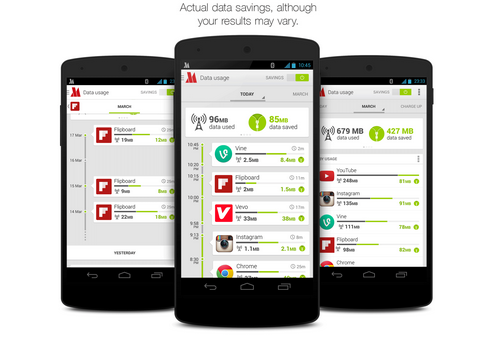
Let me use this medium to introduce you the “Opera Max” android application. It’s a data saving app recommended for all android devices.


To start with, Opera Max app is the best android app for saving mobile network data by extending your data plan and gives user the best control over their data consumption, at the end of the day, you get to save up to 50% of your data plan.

For the records, I hardly subscribe for mobile data (I normally make use of internet tricks), but I do recall the period I subscribed for the Etisalat 2GB internet plan, and within a short period (2 weeks precisely), my Etisalat 2GB monthly plan got exhausted, not that I downloaded much stuffs, but just my moment on social networks and few Live TV streaming with some Apps I run on my android device. The very first time I got to know and implement Opera Max, my story did changed. I managed to save even far above 50% of my normal data usage and the 2GB monthly plan lasted for the whole month with some extra data being rolled over for the next month.

Key Features of Opera Max
  • You get to use less data while streaming music on popular music-streaming apps like Gaana, Youtube music, Pandora etc.
  • Let’s users stream videos online with almost no-data usage. I really enjoy this part because am an addict when it comes to streaming videos. Opera Max uses their advanced technology to control or save our mobile network data while streaming videos.
  • Opera max app helps in blocking crappy background apps that requires data. With this control level, you get to stop unnecessary background apps from consuming our internet data.
  • This app also lets us monitor, track and save both mobile and WIFI data.


Where to download Opera Max?

You can download the opera max from Google play store here. It’s a free app and it works like a charm. If you’ve any question relating to this content, feel free to let me know via comment section and don’t forget to share this tips with your friends on social networks.